Evergine + Avalonia
Modern Interfaces and Industrial 3D Rendering in a Single Application
This new Evergine release incorporates integration with Avalonia, one of the most relevant user interface frameworks in the current .NET ecosystem. This integration allows creating applications using Avalonia with an integrated Evergine render surface, facilitating the development of solutions that combine modern interfaces, enterprise application logic, and real-time 3D visualization within a single experience.
This innovation reinforces one of Evergine’s strategic priorities: not limiting itself to being an isolated graphics engine, but offering 3D technology ready to integrate into real applications, with different window systems, UI frameworks, and product architectures.
Why does this integration matter?
In industrial, engineering, digital twin, simulation, or advanced visualization scenarios, the user experience includes control panels, forms, dashboards, scene trees, menus, measurement tools, property inspectors, and editing workflows, all coexisting with real-time 3D rendering.
1. What is Avalonia
Avalonia is an open-source, cross-platform user interface framework for .NET. It allows creating applications using technologies familiar to many Microsoft ecosystem developers, such as C#, XAML, and patterns like MVVM. Its goal is to offer a modern way to build desktop and cross-platform applications without being limited exclusively to the Windows ecosystem.
Unlike other frameworks that wrap native controls for each operating system, Avalonia uses its own rendering engine to draw the interface controls. This allows it to offer a consistent appearance across platforms and reduce visual differences or unexpected behaviors between Windows, macOS, Linux, and other environments.
| Languages | C# + XAML |
| UI Pattern | MVVM (familiar to WPF, UWP, WinUI teams) |
| Platforms | Windows · macOS · Linux · iOS · Android · WebAssembly · Embedded Linux |
| Own Renderer | Independent engine, no native OS controls (consistent appearance) |
| Companies | JetBrains · NASA · Autodesk · Devolutions |
| License | Open-source (MIT) |
One of the most interesting aspects of Avalonia is that it is familiar to teams that have already worked with WPF, UWP, WinUI, or other XAML-based UI stacks. The separation between view, presentation logic, and data model fits well with MVVM architectures, common in professional .NET applications. This makes it easier for teams with experience in enterprise desktop tools to adopt Avalonia without completely abandoning their prior knowledge.
Its market presence has grown especially among .NET teams looking for a modern alternative for cross-platform desktop applications. WPF remains a very solid and widely used technology on Windows, but it is not designed as a cross-platform solution. WinUI offers a modern experience for Windows, but is also very focused on that ecosystem. MAUI has a stronger orientation toward mobile and cross-platform applications with native UI. Avalonia occupies a particularly interesting space for cross-platform desktop applications, technical tools, industrial software, HMIs, editors, configurators, and enterprise applications that need a rich and consistent interface.
Another relevant aspect is its focus on industrial and embedded scenarios. In these types of applications, the UI is not simply an aesthetic layer, but a critical part of the operation. Robust interfaces, data panels, real-time visualization, touchscreen support, deployment on specific hardware, and a reliable experience over long periods of use are required. Avalonia fits well in that context because it combines the flexibility of .NET with its own rendering model, styling capabilities, advanced controls, and an architecture designed for complex applications.
In summary, Avalonia has established itself as one of the most interesting alternatives for building modern interfaces in .NET, especially when the goal is to move beyond the exclusively Windows environment without giving up C#, XAML, and MVVM.
2. Evergine + Avalonia Integration
The new integration allows creating applications where Avalonia handles the user interface and Evergine provides the 3D render surface. Conceptually, the Avalonia application acts as the main container: it defines the window, visual structure, panels, buttons, menus, layouts, styles, and interaction logic. Within that interface, Evergine integrates as a specific render area where a 3D scene can be visualized, which may contain models, cameras, lights, materials, animations, simulations, industrial data, or any other content managed by the engine.
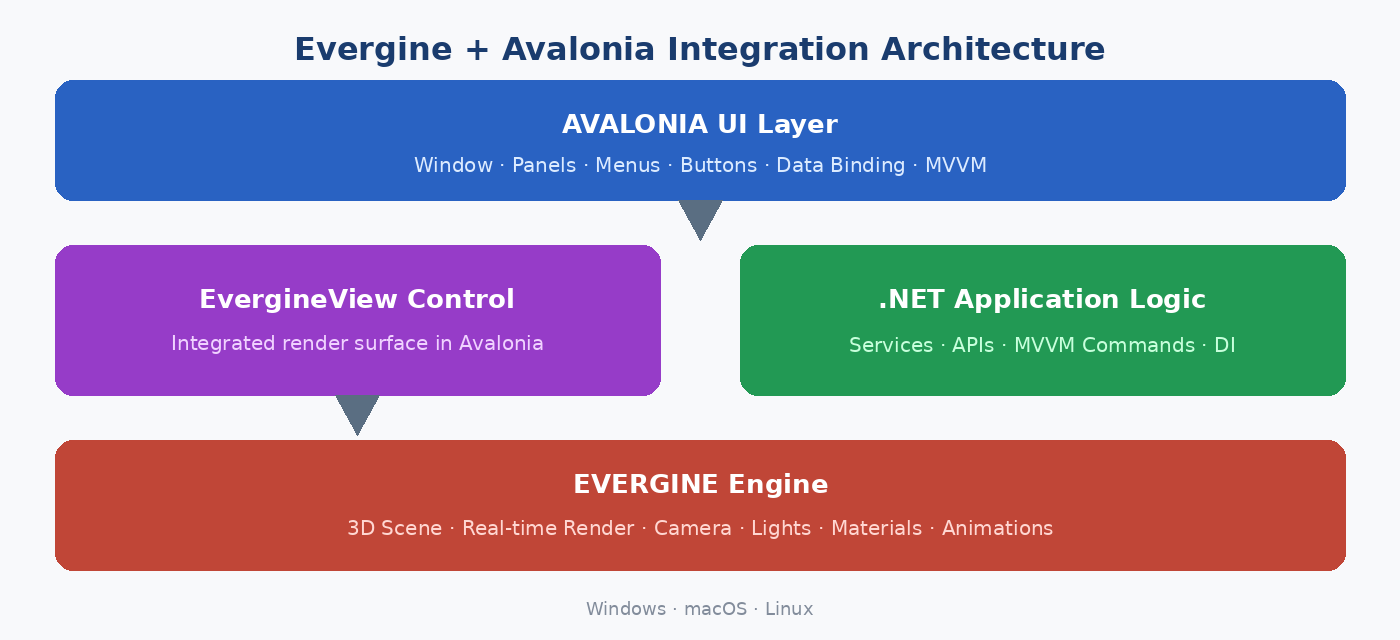
Figure 1 — Evergine + Avalonia Integration Architecture
This architecture is especially useful because it clearly separates responsibilities. Avalonia manages the user experience and application layer. Evergine manages the 3D render, scene, graphic resources, camera, lighting, and real-time visual logic. The result is an application where both technologies work together, while maintaining their specialization.
With Avalonia, Evergine gains an additional avenue to address these types of needs. The integration allows leveraging the full .NET ecosystem: services, MVVM patterns, data binding, commands, dependency injection, enterprise libraries, API access, backend communication, and all the usual logic of a professional application. At the same time, Evergine provides the ability to render advanced 3D content, work with complex scenes, and deliver a graphics foundation ready for real-time visualization.
Typical Use Cases
The combination of both technologies opens up very concrete and high-value scenarios:
- Product Configurator: the user modifies options from Avalonia panels and sees the result immediately in an Evergine scene.
- Industrial Digital Twin: the 3D scene represents an industrial installation and Avalonia shows real-time data, alarms, KPIs, or operation controls.
- Scene or Asset Editor: entity tree on the left, property inspector on the right, Evergine 3D view in the center.
- HMI / Control Panel: robust touch interface with Avalonia and 3D visualization of the controlled process or machinery.
Special Thanks
The integration of Avalonia in Evergine was made possible through the collaboration and participation of Javier Suarez, Engineer from the Avalonia team, with whom we were able to work together and who guarantees both this first integration and future updates and versions of this integration.
3. New Template in the Evergine Launcher
One of the most important new features of this release is not just the technical integration, but the availability of a new template from the Evergine Launcher. This template allows creating a base Avalonia + Evergine project directly, without the developer having to build all the initial infrastructure manually.
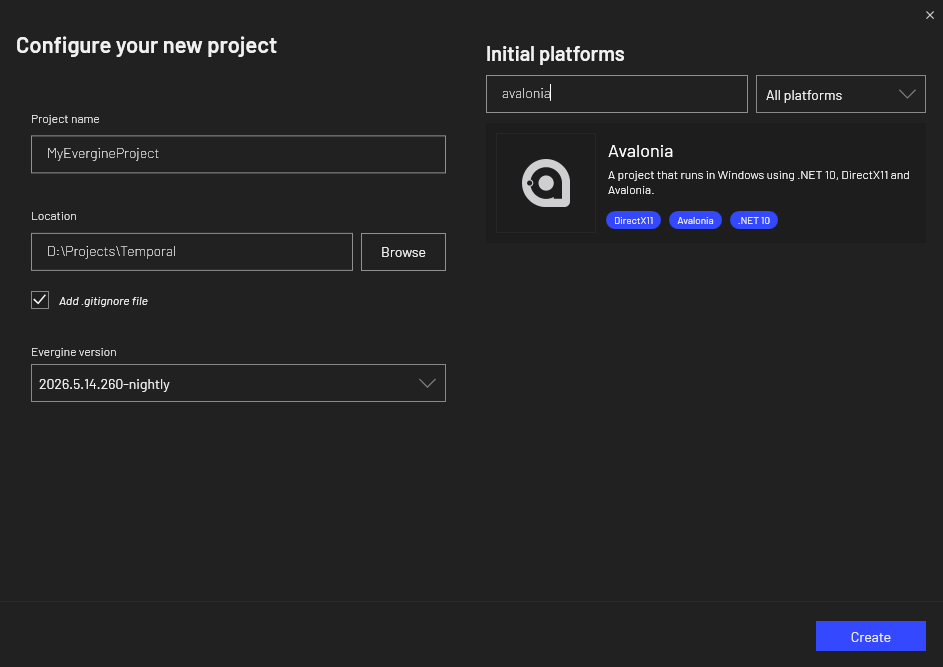
This is especially important from a product perspective. An integration can be technically powerful, but if starting to use it requires too many steps, manual configuration, or internal knowledge, its adoption becomes more difficult. The template reduces that friction. It allows the user to create a new project, run it, and quickly have an Avalonia application with an Evergine render surface ready to start working.
The template acts as the official entry point for new projects that want to combine both technologies. It defines a recommended initial structure, resolves the base configuration, and offers a clear path for developers to focus on building the application instead of investing time in setting up the environment from scratch.
| Startup Speed | Initial prototype in less time, without setting up the environment from scratch. |
| Consistency | All projects start from a structure aligned with Evergine’s recommended approach. |
| Reduced Uncertainty | The template provides a functional base without the user having to figure out how to integrate the engine. |
| Opening to New Teams | Facilitates adoption by teams that already work with Evergine but need a richer UI. |
4. Updated UIWindowSystemsDemo Example
Alongside the new template, the example UIWindowSystemsDemo (included in the Evergine samples) has also been updated to incorporate Avalonia integration. This repository is especially useful because it shows different ways to integrate Evergine into applications that use different window systems and interface frameworks. The repository includes examples with technologies such as WPF, WinUI, MAUI, SDL, and now Avalonia, making it a practical reference for understanding how Evergine can coexist with different application models within the .NET and cross-platform ecosystem.
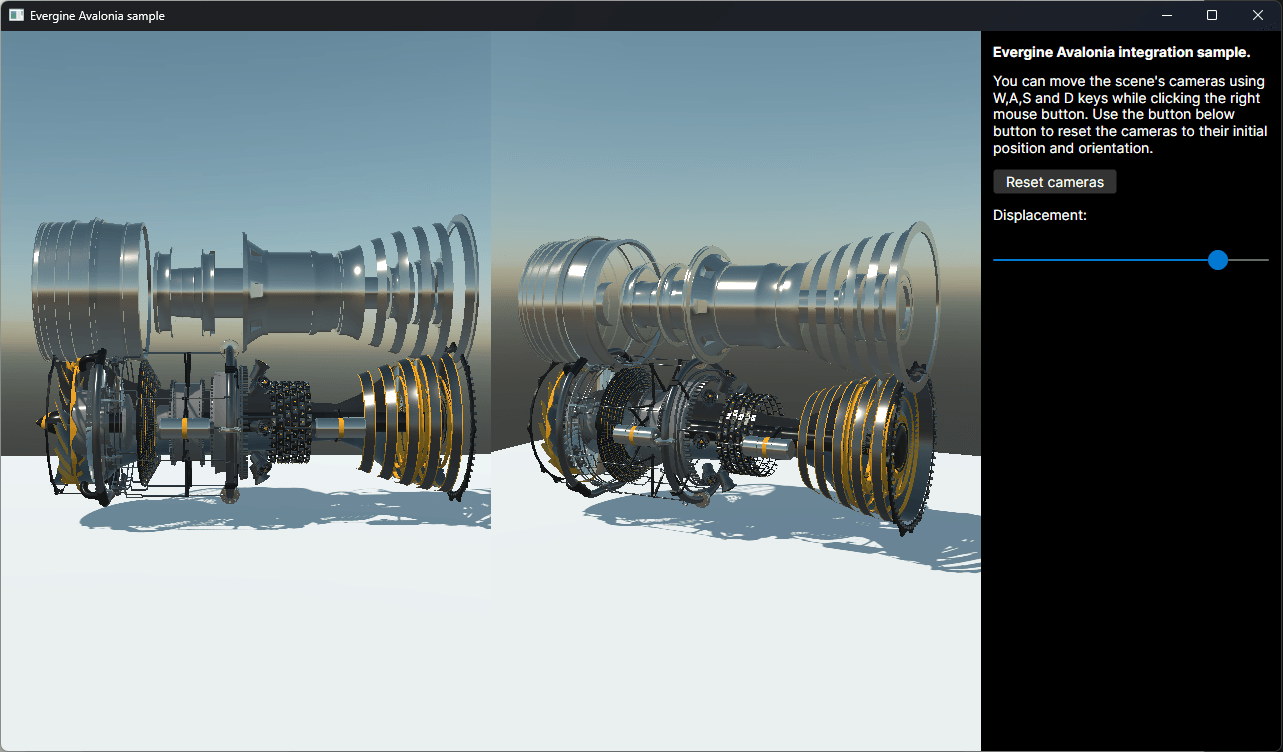
Incorporating Avalonia into the sample serves a dual purpose. On one hand, it serves as a technical demonstration of the integration: it shows how a real application is structured, how Evergine is initialized within the Avalonia environment, and how the coexistence between UI and 3D rendering is organized. On the other hand, it serves as learning material for developers who want to go beyond the initial template and review a prepared example within the official set of samples.
This type of sample is very important because UI system integrations are usually not fully understood just by reading a description. Developers need to see the folder structure, application lifecycle, control initialization, scene connection, surface size management, window interaction, and the way the engine is hosted within the UI. A working example greatly reduces the time needed to understand the correct approach.
Furthermore, being alongside other integrations, the sample allows comparing different technologies. A developer who has already used Evergine with WPF or WinUI can review the new Avalonia project and better understand what changes, what stays the same, and what possibilities this new stack offers.
Why are samples key?
UI system integrations are not fully understood just by reading a description. Developers need to see a working example to reduce adoption time and understand the correct approach. UIWindowSystemsDemo is that reference.
5. Conclusions
The arrival of Avalonia in Evergine represents an important step toward continuing to bring real-time 3D rendering closer to professional applications built with .NET. Avalonia brings a modern, open-source, and cross-platform UI technology with a development model familiar to teams already working with C#, XAML, and MVVM. Evergine brings the industrial 3D layer, the scene, real-time rendering, and the capabilities needed to create visualizers, configurators, simulators, and advanced tools.
The new integration allows combining both worlds in a single application. The new template available from the Evergine Launcher reduces the barrier to entry and offers a direct way to start an Avalonia + Evergine project. And the updated example UIWindowSystemsDemo provides a practical reference for understanding how this integration is organized within the set of UI systems already supported by Evergine.
Avalonia thus joins the Evergine ecosystem as a new option for creating rich and cross-platform interfaces around industrial 3D experiences. For .NET teams looking to go beyond full-screen and build complete tools, editors, or industrial applications, the combination of Evergine and Avalonia today offers a solid, modern, and production-ready foundation.
| New Integration | Evergine + Avalonia in a single application (modern UI + 3D rendering) |
| New Template | Available from the Evergine Launcher (functional project from the first minute) |
| Updated Sample | UIWindowSystemsDemo includes Avalonia alongside WPF, WinUI, MAUI, and SDL. |
| .NET Ecosystem | Services, MVVM, data binding, DI, APIs, and enterprise logic integrated with the 3D engine. |
| Cross-platform | Combination targeting Windows, macOS, and Linux without being tied to a single interface stack. |