Texture Views Support in Low-Level API
In this Evergine release, we have introduced Texture Views as a first-class concept in the low-level graphics API. Texture Views allow you to reference subranges within a texture, reinterpret pixel formats, and change the view type — all without creating copies or allocating additional GPU memory. This feature aligns Evergine with modern graphics APIs and removes unnecessary texture copies that previously impacted performance.
What is a Texture View?
A texture on the GPU can take many forms: 1D, 2D, 3D, cube maps, arrays, and combinations of these. Modern graphics APIs such as DirectX 12, Vulkan, Metal, and WebGPU do not allow you to bind a texture directly to the rendering pipeline. Instead, they require a Texture View — an object that describes how the GPU should interpret the texture data.
A Texture View does not contain any data of its own. It references an existing texture and provides a lens through which the GPU reads or writes that data. You can think of it as a window into a texture: it can show the entire texture, or just a portion of it, and it can even present the data in a different format or structure than the original.
Key Capabilities
Texture Views in Evergine provide four main capabilities:
Subrange Selection
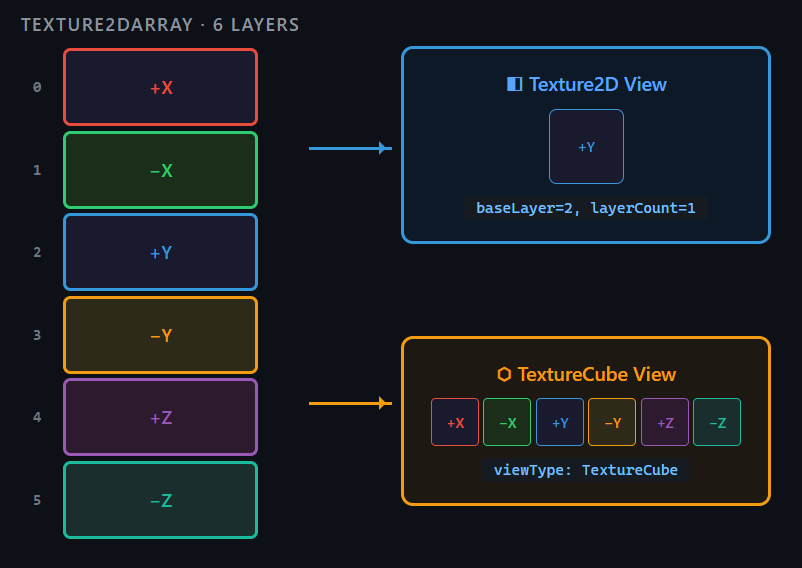
You can pick a subset of mip levels and array layers from a texture. This is controlled by four parameters: baseMip, mipCount, baseLayer, and layerCount.
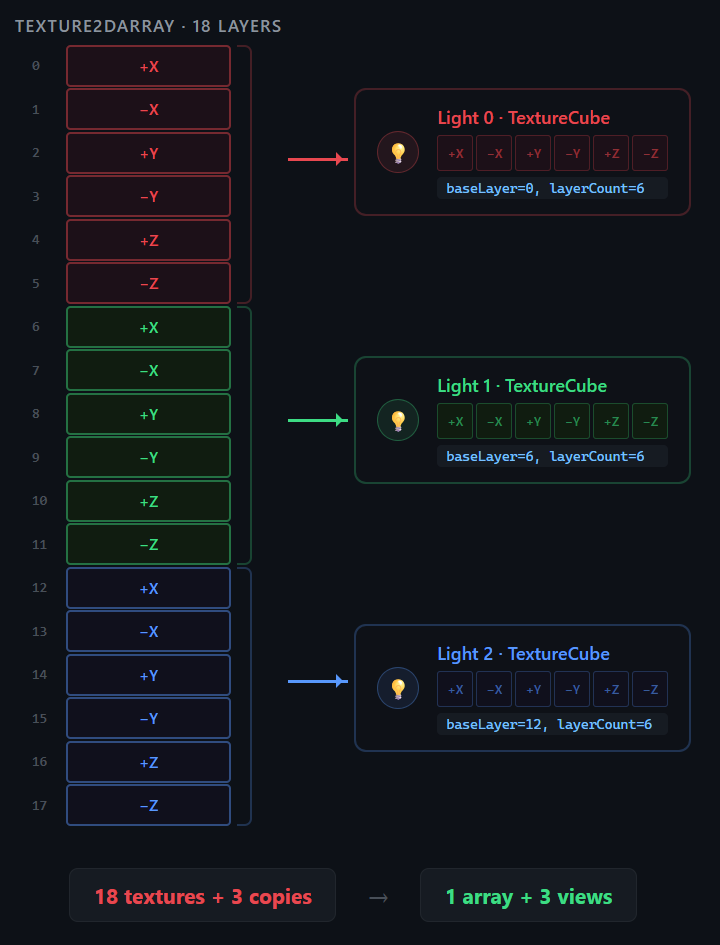
For example, imagine you have a Texture2DArray with 18 layers representing the shadow maps of 3 point lights (6 cube faces each). You can create individual Texture Views that reference layers 0–5, 6–11, and 12–17, giving each light its own cube map view without duplicating any data.
Format Reinterpretation
Texture Views can present the same data with a different pixel format, as long as the formats are compatible. For instance, a texture stored as R8G8B8A8_UNorm can be viewed as R8G8B8A8_UNorm_SRgb to apply gamma correction. Similarly, a depth buffer stored as D32_Float can be viewed as R32_Float so a compute shader can read it as a regular float value.
View Type Change
A Texture View can change how the GPU interprets the structure of the texture. A Texture2DArray with exactly 6 layers can be viewed as a TextureCube, allowing shaders to sample it using cube map coordinates. This is especially useful for cube-based rendering techniques such as point light shadow maps or environment probes.
Dual Binding
With Texture Views, you can create both a Shader Resource View (for reading) and an Unordered Access View (for writing) from the same texture. This means a compute shader can write to a texture and a pixel shader can read from it without creating an intermediate copy.
The Problem Before Texture Views
Before introducing Texture Views, Evergine created each texture with a fixed view type. In DirectX 11, for example, a texture was bound either as a Shader Resource View or as an Unordered Access View at creation time — and that choice could not be changed afterward.
This limitation made it impossible to use the same texture as both input and output. If a compute shader needed to write to a texture and then a pixel shader needed to read from it, the engine had to maintain two separate textures and perform a GPU copy between them. This doubled memory usage and consumed GPU bandwidth for every copy operation.
The post-processing pipeline was especially affected: each effect in the chain required its own intermediate textures and copy operations, adding up to significant overhead in complex scenes.
How Texture Views Are Used in Evergine
With this release, we have already applied Texture Views internally in three key areas of the engine:
Post-Processing Pipeline
Each post-processing effect now creates a Texture View with the appropriate format over its input texture. By using format reinterpretation (via ToColorFormat()), the pipeline eliminates the intermediate copies that were previously required between processing nodes.
Tone Mapping
The tone mapping pass previously required a full texture copy before it could read the HDR input. With Texture Views, the same texture is now referenced directly with a compatible format, removing the copy entirely.
Compute Depth Bounds
This compute shader calculates the minimum and maximum depth values in a frame to dynamically adjust the camera’s near and far planes, preserving depth precision. It needs to read the depth buffer, but depth formats cannot be sampled directly as color data. A Texture View reinterprets the format so the compute shader can read it.
Using Texture Views in the Low-Level API
Creating a Texture View in Evergine is straightforward. The Factory.CreateTextureView method accepts the source texture and optional parameters to customize the view:
TextureView CreateTextureView(
    Texture texture,
    PixelFormat pixelFormat = PixelFormat.Unknown,
    uint baseMip = 0,
    uint mipCount = uint.MaxValue,
    uint baseLayer = 0,
    uint layerCount = uint.MaxValue,
    TextureType? viewType = null);
Here are three practical examples:
Create a CubeMap view from a 2D array with 6 layers
// facesTexture is a Texture2DArray with ArraySize = 6
var cubeView = gfxFactory.CreateTextureView(facesTexture, viewType: TextureType.TextureCube);
Create a storage view without gamma for compute shader writing
UAV does not support sRGB formats:
var facesTextureDesc = new TextureDescription
{
    Type = TextureType.Texture2DArray,
    Format = PixelFormat.R8G8B8A8_UNorm_SRgb,
    Width = 1024,
    Height = 1024,
    ArraySize = 6,
    Flags = TextureFlags.ShaderResource | TextureFlags.UnorderedAccess,
};
var facesTexture = graphicsContext.Factory.CreateTexture(ref facesTextureDesc, "Faces");
// Remove gamma for UAV compatibility
var storeView = graphicsContext.Factory.CreateTextureView(
    facesTexture, pixelFormat: facesTextureDesc.Format.WithoutGamma());
Reinterpret a depth buffer for compute shader reading
var depthView = graphicsContext.Factory.CreateTextureView(
    depthTexture, pixelFormat: PixelFormat.R32_Float);
Texture Views are implemented across all rendering backends: DirectX 11, DirectX 12, Vulkan, Metal, WebGPU, and OpenGL.
What’s Next
This release lays the foundation for Texture Views in Evergine. In upcoming releases, we plan to expand their usage across more parts of the engine.
Additional rendering pipeline stages will adopt Texture Views to remove intermediate copies wherever possible.
We also plan to expose Texture Views more broadly in the high-level API, making it easier for developers to take advantage of this feature in their own projects without working directly with the low-level layer.
Conclusion
Texture Views are a fundamental concept in modern graphics APIs, and Evergine now fully supports them. They eliminate unnecessary texture copies, reduce GPU memory usage, and enable flexible data reinterpretation without allocating additional resources. The post-processing pipeline, tone mapping, and depth bounds computation already benefit from this feature, and more engine systems will follow in future releases.
Daniel Cáceres Maña – Senior Researcher